
QuicDoc®
Enhancements
QuicDoc 7.51 Upgrade for Windows Vista (Nov 13,
2007)
- Enhanced - QuicDoc has been modified to use Vista-compatible file
locations for databases, documents and report files. Previously, these had
been located under the folder where QuicDoc was
installed.
Windows XP - Databases, documents and
attached files, report files are now located in
C:\Documents &
Settings\All Users\Shared Documents\DocuTrac\QuicDoc Std
\Data
\Documents
\Reports
Windows Vista -
Databases, documents and attached files, and report files are now located in
C:\Users\Public\Public Documents\DocuTrac\QuicDoc
Std
\Data
\Documents
\Reports
Important: Make
note of these locations for backup/restore purposes and if you are
sharing database files and documents in a network setting. If you are updating
from a pervious version, existing files are moved as part of the update.
For example, if you install the v7.5.1 update on an XP box, all
databases, documents, etc will be moved to the Vista-compatible locations (see
above). If you were sharing the data folder from a stand-alone
machine, note that the databases are no longer accessible on the network
from the new directories. You will need to remove the original share
on the data directory, and share the new data directory.
- Fixed - there is now a notification if you try to attach a document to a
patient record and the location or path specified is invalid or does not exist
- Fixed - error when applying a filter to the Audit Log report
- Fixed - Backup utility error (QDBackup.exe) when running
against databases over a network. Restored database not being placed in
correct location.
- Fixed - Restore database function in Single PC environment not placing
databases in correct location
- Fixed - runtime error 404 when attempting to view Room Schedule when
adding a patient appointment and associating the appointment with a room
- Fixed - Under Network Setup preference and in the application to setup a
database password (SetQDDBPassword.exe), the database location field was too
small to fit very long path names. Although you could set the location, you
were unable to see the full path in the fields since it was
truncated.
QuicDoc 7.04 Service Pack 3 (May
16, 2007)
- Fixed - When doing prescriptions using the New
York state form, the indication of whether it was printed displayed 'No', even
when the prescription had been sent to the printer.
- Modified - The QuicDoc System Administrator
(SA) can now be set as a delegate for a user, allowing the SA user to
edit or delete notes. Prior to this QuicDoc had been changed so that the SA
user was unable to edit notes.
- Fixed - The search function in the Audit log
report, when searching by description was returning results only when the
search word was the first word of the description and not when it was
contained in the description.
QuicDoc 7.02 Service Pack 2 (Apr
19, 2007)
- Fixed – Formatting of some sections of note was
misaligned in QuicWord while appearing correct in other word processors
.
- Fixed - If a note was signed without switching
sections, the current section changes did not save.
- Fixed - All columns on screen were not being
printed in the printout of the appointment reminders .
- Enhancement - Only the provider associated with a
note or his/her delegate can modify a user form section within a note that has
not been signed. Delegates are able to edit or modify notes for a provider,
but cannot sign notes for the provider.
- Enhancement - Data on a user-designed form in a
note can be cleared out by clicking on the "Clear All" button.
QuicDoc 7.01 Service Pack 1 (Mar
15, 2007)
- Fixed - Office Therapy scheduler view showing
incorrect amount for patient copay. Fixed and enhanced to display patient
copay as well as, any amounts due by responsible parties
- Fixed - Search box for patient in Patient
List View loses focus after typing first letter
- Fixed - Error when opening Plan section of
Progress note.
- Enhanced- Ability to enter Quick pay amount when
sending a session to Office Therapy for all CPT codes whether standard or
non-standard
- Fixed - the Discharge Status, Discharge
Recommendations and Discharge Summary would not show in the note preview
mode
- Fixed - The quantity of a prescription is not
listed when printing the prescription on a New York State Form
- Fixed - After signing a note and adding an
addendum, the note preview displays the addendum twice.
- Fixed - The Duration and Route columns of the
"specific drugs used" section are reversed in the note preview
- Modified - Updated help file with new location of
Patient Summary Graph
- Fixed - the QDBackup utility does not restore the
Documents to correct location.
- Enhanced- Attachment location under
Setup>Preferences>Admin now works. Henceforth all attachments and scans
will be saved at this location.
- Fixed - Search for Axis II diagnosis in DSM-IV
Diagnosis section does not work
- Fixed - Spell check in the Content/Process
section of Progress Note does not highlight misspelled words
- Enhanced - Patient Advisory Leaflets are now
added to the Lexi-Comp Drug Reference List (applies only for customers who
have a license for the Lexi-Comp Patient leaflets)
- Modified- 'Marital Therapy Note' appeared wrongly
as a section for Documentation Setup. This has been removed.
- Enhanced - Vertical scrollbar added to all
textboxes in Leisure/Interests sub-section of Risks-Strengths.
- Fixed - QuicWord word processor not showing
more than one page.
- Fixed - Prescriptions were not merged on
patient merge.
- Fixed - The Day View of the QuicDoc
Scheduler would not display the correct date for international locations using
the dd/mm/yyyy format
- Enhanced - User created QuicForm files are now
included in the backup by the QDBackup utility
QuicDoc 7.00 Update (Jan
8, 2007)
- Enhanced - NEW - Now you can
create your own screens or forms to be used as sections of Notes or Treatment
Plans.
- Enhanced - NEW - Scan
documents, Insurance cards, previous records and attach to a patient's
record
- Enhanced - Added ability to assign Delegates to
providers. Delegates are able to edit or modify notes for a provider, but
cannot sign notes for the provider. Only the provider associated with a note
or his/her delegate can modify a note that has not been signed.
- Enhanced - Hot Note can now "float" over main
Patient view.
- Enhanced - Added ability in main program -
Patient View - to hide patient names (other than selected
patient).
- Enhanced - Added ability in Scheduler to hide
patient names.
- Enhanced - Document template fields can be set to
'changeable' and/or set to display gray background color when selected,
and will format merged phone numbers. Double-click field when editting
template to set or change these attributes.
- Enhanced - Ability to edit custom dictionary for
spell checking tool. See Setup..Custom Dictionary.
- Enhanced - E-mail a reminder to patient of
appointment from scheduler. When setting appointment, you can send an e-mail
reminder. Under Preferences (in Scheduler), you can customize the text of the
reminder.
- Enhanced - Group note text fields now
linked to standard and custom dictionary for automatic spell checking.
- Enhanced - Added field for Location of Service
field in notes
- Enhanced - QuicDoc Query Tool (used
primarily in association with Technical Support now has additional features
including a listing of tables and associated fields to assist in generating
database queries, ability to print the data results from a query, or 'Send'
the data results to an MS Excel spreadsheet.
- Modified - When setting access to other providers
for a patient, the list of providers now includes only active providers
- Enhanced - Added ability to hide Sidebar and
Toolbar on main screen
- Enhanced - Print prescriptions to approved NY
State Prescription. New fields added (e.g. Maximum Daily Dose) to comply with
form requirement.
- Enhanced - Group Notes now show on printed
facesheet under session history.
- Enhanced - New field to indicate "Risks and
Benefits of Medication Discussed" in Medication entry form
- Enhanced - Recall of opening window
size/position when starting program.
- Enhanced - Audit logging of New, Updated, Deleted
Appointments in Scheduler
- Fixed - When double-clicking a patient to add to
a group, the patient was made inactive by default.
- Fixed - Incorrect date for note when initiating a
Missed Appointment note from the Scheduler week view.
- Fixed - Field size incorrect in field
Problem...As Evidenced By
- Fixed - Last member's note of Group Note
doesn't print
- Fixed - Template or merged document formatting
not being saved with document when attached to patient record
- Fixed - Repeating appointments skip first date in
sequence when the repeating pattern is by month or year
- Fixed - When adding an appointment in the All
Provider view and assigning a room, the correct provider for the appointment
was not associated with the room appointment
- Fixed - Missed Appointment Note printout does not
show Date or Provider
- Fixed - Ability to add or modify service when
"Sending Appointment to Office Therapy"
- Fixed - When signing note in Preview mode,
preview doesn't refresh
QuicDoc-Office Therapy Enhancements
- Enhanced - View Appointments created in
Office Therapy in the QuicDoc Reminders (Today's Appointments) and in the Next
Patient Appointment function.
- Enhanced - Manage Office Therapy appointments and
events from QuicDoc. Add/Edit/Delete Office Therapy appointments and
events using the QuicDoc Scheduler, and launch notes from the Office
Therapy scheduler view.
QuicDoc 5.31 Update (July
28, 2006)
- Enhanced - Group Note print preview
now available before sending to printer
- Enhanced - In Group Note printout, Co-Leader
signature block is added if there is a co-leader
- Enhanced - Listing of group notes on main patient
screen now has same columns as individual notes listing
- Fixed - When scheduling group appointment only
active members are listed
- Fixed - In progress note, if Risk Factors are not
addressed, section is not added to printout.
- Fixed - common group note does not refresh for
all group members if you go back and change it
QuicDoc 5.30 Update (Jun
28, 2006)
- Enhanced - Added field for
Incidental Note for the Time of Contact.
- Enhanced - When typing a
patient name for a new appointment in Scheduler, if the patient is not in
QuicDoc, you are prompted to add and re-directed to a form to add the patient
before scheduling the appointment.
- Fixed - Printout of password from User Setup not
printing correctly.
- Fixed - When manually importing providers
from Office Therapy, default password that is created for the provider is now
encrypted. QuicDoc was creating the password but not encrypting it in the
database.
- Fixed - Error 5 when loading latest version of
Lexi-Comp Drug Reference (1/2006).
- Modified - When creating patient appointment in
Scheduler, the patient's phone number is read in from patient setup
information and cannot be entered as before. Thus, if an appointment is
repeated and the patient's phone changes, later appointments are associated
with the changed number. (Note: If you used these fields to
add temporary or alternate phone numbers, now use the Note field)
- Fixed - When 'Sending a record' of a session to
Office Therapy, if there is an adjustment or payment on the date of the
session, QuicDoc could not insert a record. Assuming that there is not
already a charge or an appointment set in Office Therapy for that date,
QuicDoc will insert an appointment that can be "power charged".
- Modified - Calculation for Average Time to Intake
in Demographics Report and Quality Assurance Report is now based on
the average difference between Admission or Intake date and Initial contact
date. Before, this calculation used the date of the Intake Note; however, if
more than one Intake Note was done for a patient, the average included both
Intake Notes.
- Enhanced - Track AIMS scores
(see Patient...History...AIMS on main menu)
QuicDoc 5.21 Service Pack 21 (Apr
18, 2006)
- Enhanced - Added DAP (Data, Assessment,
Plan) Note format. Under Setup..Documentation Setup go to Progress Note and
add DAP section.
- Enhanced - Added preference to hide user's
schedule to others. Under User/Provider setup, select Exclude from Schedule.
User will still be able to see their own schedule, but others won't see
theirs.
- Enhanced - added button to show currently
selected patient's Disclosures of PHI in PHI log.
- Fixed - Patient list width resizing
when Reminders window is active and QuicDoc is restored from minimized
state.
- Fixed - Employment/School status not printing in
Intake Note if gender of patient not indicated.
- Fixed - Error displaying patient information,
under patient setup, where patient's secondary insurance company has been
inactivated.
- Fixed - Default CPT doesn't reset in Scheduler
when typing to search for patient from list.
QuicDoc 5.20 Service Pack 20 (Mar
31, 2006) (**Skipped to V5.20 and SP20 to make version and service
pack number consistent)
- Fixed - Type mismatch error when editing a
prescription - clicking OK to save when no changes have been made
- Enhancement - Added ability to filter contact
hours by Insurance Company - includes group hours
- Fixed - Link to sample datasheet for Lexi-Comp
Drug Reference missing - sample datasheets were not included in update
- Enhancement - Added link to QuicDoc Startup Guide
from main menu - Help...QuicDoc Startup Guide
QuicDoc 5.18 Service Pack 15 (Mar
1, 2006)
- Enhanced - added fields under Diagnosis section
for Lowest Lifetime GAF and for additional comments
- Fixed - addressed formatting issues for Diagnosis
and Content sections in note output
- Enhanced - if an appointment or event is
associated with a Room, the same room can be associated it when it is made a
repeating appointment or event
- Enhanced - Added Vital Signs and Physical Exam
section that can be added to a note
- Enhanced - Substance Use section - added new
drop-downs to indicate Nicotine Use and Drug Use (e.g. None, Not Assessed,
etc.)
- Fixed - Patient Group Notes listed by Date in
descending order to be consistent with other Notes listing
- Enhanced - QuicForms - Check for new forms over
the internet and download them from within the program
- Fixed - Under certain conditions, the Patient
list "disappears" when restoring QuicDoc from a minimized state
- Enhanced - New Pharmacy
List added. Add pharmacies with address, phone, fax and contact
information and select from list when entering prescriptions.
- Enhanced - New fields added for Pharmacy Fax
number and Notes when entering prescriptions.
- Enhanced - Send e-mail reminder to patient when
scheduling a new appointment in scheduler
- Enhanced - Reminders now shows General
Tasks from scheduler and Patient-specific tasks that have not been
completed
- Fixed - Appointments listing under Reminders
now shows status of cancelled appointments
QuicDoc 5.17 Service Pack 14 (December
23, 2005)
- Fixed - Accessing of most current appointment
data when one user has modified an appointment while another user is in
process of editting the same appointment
- Enhanced - Audit tracking now includes
logging when a user has viewed patient diagnosis or medications from the main
screen
- Fixed - Street addresses of more than one line
not wrapping correctly when using the Letter function
- Fixed - Text not printing on form for pages,
other than the current page, when printing in QuicForms
- Enhanced - Saving of pane sizes for Patients,
Users, Groups, Referral Sources and Insurance Company views
QuicDoc 5.16 Service Pack 13 (December
12, 2005)
- Fixed - When saving note as an Adobe PDF, the
file was not created unless you selected 'Yes' to view in Adobe Reader
- Fixed - Recurring appointments not working
correctly on systems using d/m/yy date format
- Fixed - Print preview and printed output
sometimes differ (e.g. preview appears ok, but all words underlined on
printout, or only bolded sections heading are printed) This behavior has been
seen on only a few HP and Dell printers using new print drivers.
- Fixed - Scheduler Report not showing status for
appointments cancelled by therapist or provider
QuicDoc 5.15 Service Pack 12
(November 20, 2005)
- Fixed - CPT or service code not
saving for user-defined note
- Enhanced - Print-out of contact List in
scheduler's address book now prints contact's cell or mobile phone
- Fixed - Some elements of Psychosocial History
not being rendered on printout (Social History-Religious Issues and
Legal History-Probation)
QuicDoc 5.14 Service Pack 11
(November 14, 2005)
- Enhanced - Formatting/appearance of Note -
Session and Patient Information areas on first page
- Enhanced - Risk Factors details text length
increased
- Fixed - Calculation of Session # when back dating
a new progress note
QuicDoc 5.13 Service Pack 10
(November 1, 2005)
- Enhanced - Added Cell/Other Phone listing to
Patient Details screen and to Facesheet
- Enhanced - Expanded Start Time options for
calendar to include 10am, 11am, 12pm, 1pm
- Enhanced - Included CPT/Service Code Description
in list of Sessions/Notes
- Fixed - Calendar Start-End times did not refresh
after checking/unchecking Show non-prime hours
- Enhanced/New Feature - QuicForms can now handle
forms using segmented text fields and fill-in bubbles
- Fixed - Military/Legal History not printing out
on note
QuicDoc 5.12 Service Pack 9
(October 25, 2005)
- Enhanced - Added
icons/images to note history list when a session note has been signed and
when an addendum has been added
- Fixed - All Provider View appointment slip
printout printing incorrect date
- Fixed - Provider signature showing twice on a
printed note when provider has no supervisor and electronic signatures
activated
- Fixed - Spell check now functions in addendum on
a signed note
- Fixed - Signature picture (icon) on list of
treatment plans not appearing for signed treatment plans
- Fixed - When you select inactive patient
list, the menu entry still refers to showing inactive patients. Upon
clicking it again the list changes to active patients and the menu entry says
SHOW ACTIVE PATIENTS.
- Fixed - Under the Previous Medications note
section, the printout is labeled "Reason" instead of "Response to
Medication(s)"
QuicDoc 5.11 Service Pack 8 (October
1, 2005)
- Fixed - Option to include page breaks when batch
printing of Incidental Notes
- Fixed - Incidental Notes - print-out does
not include Type of Note (e.g. Call from Patient)
- Fixed - Missed Appointment Notes - when batch
printing, inserts statement that 'Electronic Signature Pending'
- Fixed - Calculation of hospital days was based on
Date of Discharge minus Date of Intake Note and was calculating incorrectly.
This calculation has been changed to Date of Discharge minus Date of
Admission from Patient setup
- Fixed - Error sending Prescription if a carriage
return appended to patient address
- Fixed - Error when doing Group Notes if text in
some of the fields exceeded 255 characters
- Enhanced - Added Grand Total hours for Contact
Hour Report
QuicDoc 5.10 Service Pack 7 (September
19, 2005)
- Fixed - Pick-list of Severity-Frequency of
problems in Identifying Information section of Intake Note not
drawing from database correctly
- Enhanced - Added Company Name field under
e-Prescription setup
- Fixed - e-Prescribe setup now forces uppercase on
state field since error occurs when sending a prescription if state is not in
uppercase
- Enhanced - When initiating a note from the
Scheduler, the patient's default CPT is used if a CPT code has not been
entered for the appointment
- Enhanced - When selecting a CPT or service code
in Session Info, it now adds the duration from the CPT code list
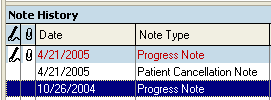
- Enhanced - Added columns on Note History and
Treatment Plan listing to indicate whether the note/plan has been signed and
whether there is an addendum - indicated by a pen and paper clip
icon respectively.
QuicDoc 5.09 Service Pack 6 (September
9, 2005)
- Fixed - Switching from Inactive to Active
Patients and visa versa.
- Enhanced - Send Diagnosis to Prescription System
added
- Fixed - Occasional error when manually importing
patients from Office Therapy - "the field is too small to accept the amount of
data ..."
- Fixed - Side taskbar links for Compose, Status,
Administration, and Account Management not working in Electronic Prescription
window
- Fixed - Problem when minimizing secondary browser
window in e-Prescription System
- Enhanced - Updated QuicDoc Help File with
corrections and to include updated features
- Fixed - Circle fields not being saved
properly on some forms in QuicForms
QuicDoc 5.08 Service Pack 5 (August
29, 2005)
- Fixed - Send Session to Office Therapy - pm
start times being changed to am (for example, if session was 9:00 PM,
when sending to Office Therapy, it reported it as being 9:00 AM
- Fixed - Repeating Appointment link in All
Provider View not working
- Fixed - Print Appointment Slip link in
All Provider View not working
- Fixed - Setting Patient word preference to Other
(e.g. Student) not saving
- Fixed - Setting Scheduler and Group Access levels
for users not saving under some conditions
- Fixed - Error when sending Note to Word
Processor - QuicDoc is reporting an "tmprtf.rtf is missing"
- Fixed - Discharge Note not showing Progress
Toward Goals
- Fixed - When saving a note as an Adobe PDF file,
the file is not created if you select not to display the pdf
- Enhanced - Patient word preference (e.g. Client,
Patient) is now applied to labels on screen. Word preference had previously
only been used when generating notes and reports.
- Enhanced - Added fields for Account # and SSN
when adding new patient from Scheduler
- Fixed - Error loading All Provider View (invalid
use of NULL). Caused by deleteing an Activity added using Activity Scheduler
and then deleteing the activity for each attendee rather that selecting Delete
for All.
- Fixed - in the print out of the Previous
Treatment - Previous Medications section of Intake Note, the label for
Response to Medication reads 'Reason' rather than
'Response'
QuicDoc 5.07 Service Pack 4 (July
28, 2005)
- Fixed - Deleting a Missed Appointment note did
not delete the link to a note in the Appointment Scheduler
- Fixed - Incorrect Note Type assignments (i.e.,
Missed, Cancelled) when creating Missed Appointment Notes from
Appointment Scheduler
- Fixed - Treatment Plan Tracker link when in
Treatment Plan was disabled
- Fixed - Label (on session information
screen) of note incorrect for user-created note types
- Fixed - Calendar on date selection screen for
when discharge criteria met was not displaying
- Fixed - Risks/Strengths section not printing in
preview
- Fixed - Suicide/Homicide details not saving under
certain conditions
- Fixed - Date spin buttons not functioning on
Disclosure of PHI Details screen
- Fixed - Sequence list not clearing after
returning from Create Sequences screen when generating note
- Fixed - Error finding file (tmprtf.rtf) when
sending note to word processor
- Fixed - Progress toward goals in Dicscahrge Note
print-out not appearing
QuicDoc 5.05 Service Pack 3 (July 7,
2005)
- Fixed - Discharge Information and Family History
sections of note not appearing on note preview or print-outs
- Fixed - Non-default Report Headers not printing
on note preview or print-outs
- Fixed - Error loading Groups in Group View when
all group members made inactive
- Fixed - If all group members are deleted from a
group, there is an error displaying groups in Group View. Now you are unable
to delete all members. You can, instead, delete the group.
- Fixed - When inserting a text file into
the Content section or a progress note, carriage returns were not being
inserted.
QuicDoc 5.04 Service Pack 2 (July 1,
2005)
- Fixed - Error saving interventions if duplicate
intervention entered in Problems-Goals/Objectives-Interventions section
- Fixed - View Previous Progress Note function (in
Content section) returning incorrect records
QuicDoc 5.03 Service Pack 1 (June 30,
2005)
- Fixed - Length of Visit and Time, Program
Name, and Type of Visit not printing on Progress Notes
- Modified - Font Size of notes changed from
Arial 11 to Arial 10
- Fixed - Objectives numbers incorrectly
started at #65 instead of #1 when printing Problem-Goal-Objectives section
- Fixed - Label for Patient Name on Next
Appointment screen not appearing correctly
- Modified - Menu item on right-click added to be
able to delete document template linked to patient. Delete key can also be
used when document is selected.
- Fixed - Error 381 Invalid Property Array when
scheduling an appointment in QuicDoc Scheduler. This error occurred
intermittently when selecting a patient from the drop-down list.
- Fixed - Note preview not generating some sections
(e.g. Diagnosis) when using user-defined sequences.
UPGRADE - QuicDoc Version 5 (June 22, 2005)
*** What's
New in QuicDoc V5 ***
- Group Therapy Notes
- Enter Provider Work Schedules
- Patient Check-in feature for scheduler
- Create Session Notes from the Scheduler
- Customize selection and order of sections for
notes
- Create new note types (e.g. Psychiatric
Evaluation)
- Quickly view History of Diagnoses and Medications
for patients
- Quick Preview for Notes with Search Feature
- View Previous Progress Notes (Content
narrative) easily when doing a new Note
- Create Document Templates for merging
- Show listing of insured patient for each
Insurance Company in Insurance View
- Show listing of referred patients for each
Referral Source in Referral View
- More Pick Lists (e.g. Psychological Tests in
Psychological Testing section)
- New Integration features with Office Therapy
- View a client's ledger in QuicDoc
- Send a record of a
session documented in QuicDoc to Office Therapy for billing
- View
the Office Therapy Calendar in the QuicDoc Scheduler
- - New Windows XP Look-and-Feel
- - Internet-based Electronic Prescriptions
(Optional Subscription-based Service)
QuicDoc 3.90.65 (April 27,
2005)
- Enhanced - Added ability to set Default
folder in QuicWord settings to open when opening or saving a document in
QuicWord.
- Enhanced - Added Session Number field for
Progress Notes. User can 'Calculate' session number or enter it
manually.
- Enhanced - Medications on screen and in
generated note now are sorted by Start Date of medication (newest medication
first).
QuicDoc 3.90.64 (April 13,
2005)
- Enhanced - List of Prescribers now populated
based on presence of DEA Number rather than Discipline labeled as
'Psychiatrist'.
- Fixed - Word-wrapping in generated note
for SOAP note and other sections
- Fixed - Identifying Information section not
saving when carried over from previous note and not
modified.
- Enhanced - Print options for font type,
size, and style added for Scheduler printouts.
- Fixed - Internet link for Help...QuicDoc
Online Support from main menu.
QuicDoc 3.90.63 (February 23,
2005)
- Fixed - Licensing verification error (Error connecting to
machnm1.exe) when launching QuicDoc on Windows XP SP2 . This
error occurred occasionally on some installations with Windows XP(SP2).
- Fixed - Record not being added in Audit Log when patient status was
changed from Active to Inactive or from Inactive to Active.
QuicDoc 3.90.62 (December 29,
2004)
- Enhanced - Diagnosis tab listing of current
patient diagnosis now includes specifiers (e.g. Principal, Provisional, Rule
Out, By History).
- Enhanced - Authorization # field increased to 30
characters
- Enhanced - e-mail field added to options for
import of delimited text files for Referral Sources.
- Fixed - Diagnosis codes for Personality Disorder
NOS and Antisocial Personality Disorder corrected.
QuicDoc 3.90.4 Service Pack (September
16, 2004)
- Enhanced - Enhanced – Added purge feature for
patient with no activity. See File...Administration...Purge Patients. Can only
be accessed by System Administrator. .
QuicDoc 3.90.3 Service Pack (August 9,
2004)
- Enhanced – Better
Compatibility with Lexi-Comp
QuicDoc 3.90.1 Service Pack (March 24, 2004)
- Fixed - Error linking to Office Therapy database if Office Therapy
database is password protected.
- Fixed - QuicDoc exporting some patients to Office Therapy with purged
indicator set to On.
- Fixed - New patient added in QuicDoc Scheduler not auto-exporting to
Office Therapy.
- Fixed - Patient information not filling in after new patient added in
scheduler. Previously, if you added a new patient in the Scheduler, when
it returned to the new appointment dialog, you had to select the new patient
from the list. Now, after adding a new patient and returning to the new
appointment dialog, the patient name, phone, etc. is filled in.
- Fixed - Provider could be deleted if not associated with a patient as a
primary provider, but if provider had authored notes or had appointments
scheduled.
QuicDoc Version 3.90 (March 3, 2004)
- Enhanced - Separate PSYCHOTHERAPY NOTES - you can now
enter Psychotherapy Notes (as defined by HIPAA). These notes are separate from
the patient record and are encrypted in the database. Additional password
security can be setup.
- Fixed - Auto-export new patient from QuicDoc to Office Therapy sending new
patient to purged list in Office Therapy.
- Enhanced - Diagnoses on Axis I and II can be coded as being "By History".
- Changed – Goals section of Intake note no longer shows Progress or Date
Achieved.
QuicDoc Version 3.86.54 (September 9, 2003)
- Enhanced – Better compatibility with Windows XP
TabletPC.
QuicDoc Version 3.86.53 (August 21, 2003)
- Enhanced - QDQuery.exe - Database Query tool for use with Technical
Support calls.
- Updated DSM-IV-TR codes.
- Enhanced – Ability to work with updated system components to resolve a Run
Time Error 7 on some machines.
QuicDoc Version 3.86.5 (June 18,2003)
- New Feature - Disclosure of Private Health Information
Log - Allows you to log and track when you disclose or release
private health information, as required by HIPAA.
- New Feature - Audit Logging - Allows you to create audit
trail of user activity in database.
- Enhanced - Set a Database Password from within QuicDoc. Now easier to
password protect your database to ensure security of confidential data.
- Enhanced - Inclusion of Diagnostic Info Sheets - designed
for providing diagnostic information for patients. These are reproduced in
HTML and PDF format with the permission of National Institute of Mental
Health.
- Enhanced - Improved Import Text File function. Allows mapping of text
files to database fields and saving/loading map files.
- Enhanced - QuicWord word processor now allows saving of default page
margins for documents.
QuicDoc Version 3.86 (April 4, 2003)
- Enhanced - Data Exchange with Helper 6.1 or higher.
- Enhanced - Print Week Schedule as HTML.
- Updated DSM-IV-TR code.
- Updated - Help File.
QuicDoc Version 3.85.5 (March 4, 2003)
- Fixed – Error finding file when opening documents, notes in Word. This
occurred on some systems when QuicDoc is installed under Program Files folder
and where Word was set as the default word processor.
- Enhanced - Automatic export to Office Therapy V5.05. Can
set QuicDoc to automatically export new patients, referral sources, and
insurance companies when added to QuicDoc.
- Fixed - Error when adding Referral Source from Patient setup.
- Fixed - Some QuicForms forms not rendering correctly. Text fields were not
aligned properly.
QuicDoc Version 3.85.4(August 22, 2003)
- Fixed – Error finding file when opening documents, notes in Word. This
occurred on some systems when QuicDoc is installed under Program Files folder
and where Word was set as the default word processor.
QuicDoc Version 3.85.2 (July 15, 2002)
- Enhanced – Added ability to filter Office Therapy patients by provider
when importing. Also added ability to set a default provider in QuicDoc to
associate with imported patients from Office Therapy.
QuicDoc Version 3.85 (June 19, 2002)
- Fixed - Not able to enter duplicate medications for a patient.
- Fixed - Item not found when creating new incident of care
- Enhanced - Immunizations, Other field increased in length to allow up to
255 characters.
- Enhanced - Database update utility automatically launched for this update
when QuicDoc application run for 1st time, if database hasn't been updated.
- Enhanced - Provider name and program added to Patient Facesheet printout.
- Enhanced - Added function to recalculate authorizations remaining
(File..Admin..Recal)
- Fixed - Note Audit sometimes returned false positives and false negatives.
- Enhanced - added ability to modify/add/delete Events from main screen in
Scheduler.
- Enhanced - QuicDoc database utility improved for repairing and compressing
databases.
- Enhanced - Option to print address on labels on 1 or 2 lines.
- Enhanced - Allow for additional patient phone fields with user-defined
labels (e.g. Fax, Cell).
- Fixed - Search Availability function in Scheduler.
- Enhanced – Data Import from Office Therapy V5 Practice Management System –
import client, referrals, therapists, insurance company information from
Office Therapy. Once imported, view transaction ledger of Office Therapy
clients from QuicDoc.
QuicDoc Version 3.8 (December 14, 2001)
- Fixed - When printing problems-objectives to Quicword , not printing all
wording for problem.'
- Fixed - Report not printing ssn in page header.
- Fixed - Spelling error 'gang inlovement'
- Enhanced - Added therapist name to F2 function to lookup future apts, and
if more than 1 appointment,
- displays a list of them.
- QuicDoc 38 update utility modified to also update Tutorial databases
- Enhanced - Ability to print schedule sorted by Provider for a day or range
of days
- Enhanced - Note field for an appointment is visible on Day view when slot
is selected.
- Enhanced - Appointment conflict checking checks for appointment in same
day/time range for a provider, and when a patient is scheduled, it checks to
make sure another provider hasn’t scheduled the same patient in the same
day/time range
- Enhanced - Batch print all or note range has option to have page breaks
between notes or no breaks for a contiguous note.
- Fixed - Error in schedule when changing time of appt from am to pm (e.g.
6-7am to 6-7 pm) If entered it as 6am to 7pm.
- Enhanced - Added Provider Name on list of expiring authorizations for Sys
Admin in Reminders.
- Enhanced - Added ability to mark scheduled tx plan as done and to schedule
next tx plan due when doing a tx plan.
- Fixed - Order of problems and objective not constant when printing out.
- Fixed - Problem on W2000 machines reading Form File List in QuicForms.
- Enhanced - Added new field, Reason for Referral, to patient entry form.
- Ability to print schedule in 5, 10, 15, 30 minute increments
- Enhanced - Optimize/Repair database option in QuicForms.
- Enhanced - Added ability to set mask for postal codes in patient
entry.
QuicDoc Version 3.77 (September 20, 2001)
- Fixed - If patient name typed directly into scheduler slot, and then
appointment is edited, message displays that patient is not found. Now you
cannot type into a new slot to initiate a new appointment; once added, though,
you can type in the slot.
- Enhanced - Selecting a patient in scheduler pulls in default CPT.
- Fixed - QuicLink patient import from Therapist Helper where patient name
contained an apostrophe.
- Modified - Preferences now allows entry of executable name only for
default word processor (e.g. winword.exe). Entry of full path (e.g. C:\Program
Files\Microsoft Office\winword.exe) does not work on some Windows 2000
systems.
- Fixed - Form/Measure documents deleted when opened in QuicWord from
'front-end' of QuicDoc (i.e., File...Print...Measures/Forms/Letters).
- Fixed - Import Delimited File wizard was not ignoring first record if it
contained field names.
- Enhanced - All Provider View allows user to set 1-9 columns per page to
print.
- Enhanced - Added fields under patient information for patient's E-Mail
address and Referral Source information for E-Mail address. You can now select
patient or referral and use menu item (Write...Email) to start default email
program.
- Spell Check all text/sections at once in SOAP Note.
QuicDoc Version 3.75 (August 8, 2001)
- Fixed - Appointment slip not printing correct date from week view.
- Modified - Location of database password storage file for single PC
installs.
- Enhanced - Added fields for Cultural and Religious issues in PsychoSocial
History - see Family-Social History Section.
- Enhanced - Added option for 'never married' in PsychoSocial History -
Family section for parent marital status.
- Enhanced - Added 'disabled' to pick list for Employment in Patient Setup.
- NEW - Pain Assessment and Nutritional Assessment - see Assessment menu.
- Enhanced - Added fields to record Leisure Activities and Interests - see
Risks/Strengths section in notes
- Enhanced - Added ability to set page header (e.g. patient name, ID) to
print, without having to re-check the setting each time.
- Enhanced - Demographics report can filter by program and active/inactive
patients.
- Enhanced - System Admin. can set/change passwords on one screen, and the
password last change date is recorded and saved to the database.
- Enhanced - Patient, User, Referral Source and Insurance Views have a New
Look, and an added Find feature for searching names on the respective lists.
- Enhanced - Patient Task List can now be set to display all Tasks or just
those tasks not completed - see Setup...Preferences.
- Enhanced - improved patient import functioning from Therapist Helper to
QuicDoc.
- Fixed – Pick-list items with double quotes " " could not be modified or
deleted once added to list. Caused Error 3077.
- Fixed - Notes were not being 'finalized' when QuicDoc set for Electronic
signature and Provider had no supervisor.
- Enhanced - Added ability to print lists and labels of Inactive Names (e.g.
Inactive Patients)
- Enhanced - added fields on Patient setup screen to enter admit and
discharge dates
QuicDoc Version 3.72 (May 17, 2001)
- Fixed - Help button on Report Headers screen did not go to Help.
- Security Enhancement - Added optional, additional security measure of
attaching a password to database. To use this feature Run SetQDBPassword.exe,
located in QuicDoc folder.
- Fixed - When switching to another provider schedule, from All Provider
view, it defaults to today’s date. Changed so it stays on same date when you
change to different provider.
- Fixed - In QuicLink, data exchange for Therapist Helper, importing
patients from TH, sometimes generated a duplicate ID and wouldn’t import to
QuicDoc. Also, when exporting patient to Helper, error 13 type mismatch.
- Fixed - Not getting missed appointments in note audit report.
- Fixed - list not refreshing after reassignment of patients to different
provider.
- Enhancement - When adding an authorization, checks if an insurance company
has been entered for patient. If not, you can enter one.
- Security Enhancement - temporary word processor files
created when generating a note, are always deleted now after loading in
QuicWord. This feature only works if you are using QuicWord as the default
word processor. If not, make sure all files beginning with Report are deleted
from QuicDoc folder (e.g. Report1.rtf, Report2.rtf)
- Fixed - QuicDoc abruptly quits when OK pressed, when scheduling an
appointment for a patient in QuicDoc front end.
- Fixed - Search for diagnosis code or name does not work properly when
diagnoses are filtered (e.g. Mood Disorders).
- Enhancement - Added functionality to filter patient list by provider.
Applies only when logged on as System Administrator.
- Enhancement - When using Batch print, you can now select a report header.
Previously, the default header was used.
- Fixed - Users with access to all providers schedules, see all providers To
Do's in the reminders screen.
- Fixed - Batch notes not adding Date/Time of Electronic Signature if
signed.
- Fixed - Not able to put in more than one Previous Treatment if Hospital
Name or Doctor Name is the same.
- Enhancement - QuicForms - If form is re-scaled (e.g., 90%), fonts are
re-scaled proportionally.
- Fixed - Query for Baseline vs. Most Recent in Outcomes graph and Report
not always working properly.
- Enhancement - Added Field under Problems-Objectives-Interventions section
to add a narrative regarding Progress Toward Goal.
- Enhancement - If note is electronically signed and an Addendum is added,
QuicDoc saves user id creating or changing addendum, and dates addendum was
created and changed.
- Enhancement - Backup program allows backup of documents in \Documents
folder.
- Now reads Regional Settings for date format - all date controls allow for
input, reading into from database, and output to database using MM/dd for
dd/MM format, depending on regional setting.
- Now allows for format mask for phone number formats in different countries
(e.g. New Zealand, Australia), user can select from several common ones under
Preferences. To add a format, user can add to a file named phoneformats.txt in
the following format, one per line: "United States", "###-###-####"
- Now allows for changing SSN label name to another ID, and applying a mask
(e.g. ###-####). Mask can be numeric or alphanumeric and allows up to 9
characters. See Preferences.
- Now allows changing the label or name for Account # (e.g. Patient No.)
under Preferences menu.
- Settings for Electronic Records, Word Usage, Password Recall, Allow Users
to Change Password are global and controlled by the System Administrator. See
Preferences.
- Pick-lists for Race and Religion can now be modified. Add on the fly or go
to Clinical Data Lists from Setup menu.
- User-defined fields under Additional Patient Information can now have
pick-lists created by user.
- System Administrator now can go to a Password Setup Screen, listing all
Users with their UID's and Passwords, and allowing SA to change User's
Passwords more easily. SA can also see Date Passwords were last updated. This
feature is important were Passwords must be changed on a regular basis (e.g.
every month).
- Repeating appointments in Scheduler are now marked in the database with
the ID of originating appointment. Thus, users can delete ALL or Selected
Appointments or a repeating group, rather than having to go to each to delete
them.
- All Time Controls in Scheduler allow for input and display of Military
Time if this option selected in preferences. Military time is displayed on
Appointment Control and in all print-outs.
- Added field under Goals-Objectives section to write more of a narrative
for goal progress
- Added fields to capture who created an addendum for a locked note (when
Electronic Record set to True) , when created, and when last changed.
- Added functionality to do prescriptions in the front-end of the program.
See Prescriptions under Patient menu. User interface for doing prescriptions
has improved and is easier to use.
- Added Psychosocial History form in QuicDoc3\Documents folder. This file,
in RTF format, can be used by therapist or patient to fill out by hand. Then,
data can be entered in QuicDoc. See Psychsocial History.RTF.
- Fixed - Incorrect link to QuicDoc Tech Support web site
page.